Enemy EQS
Coming into Final Year, we had a pretty decent implementation for the core logic of our enemies. Their movement is based off the Plugin Cpathfinding, which is essentially a combination of Sparse Voxel Octree and A* Pathfinding. The Voxel volume determines what nodes the enemy can or cannot interact with by checking if anything like a wall or obstacle overlaps with that part of the volume. The A* Pathfinding method simply iterates over several nodes visible to each other to map a path for the enemy to follow, making them avoid obstacles.
Below I’ll cover why synchronous calls buckle, why our Async solution initially felt like a lie, and how we finally solved the some spooky frame hitches.
Attempt 1: Synchronous Pathfinding
The Approach: Calling FindPathSynchronous directly on the Game Thread.
Why it failed: The main thread pauses until a path is found. The plugin costs up to 2ms per call, meaning multiple enemies requesting paths in the same frame stacked up into massive, noticeable stutters, and because of their random nature, the stutter would only happen when more than one enemy fired on the same thread.
The Outcome: Great for a single path on a tiny grid. Terrible for a game with multiple active enemies. We were struggling to maintain more than 5 enemies in the world at the same time.
Attempt 2: Async Pathfinding
The Approach: I swapped to FindPathAsync to offload the A* math to background threads.
Why it failed: It still hitched sadly. Bizarrely, the hitching happened regardless of whether the path succeeded or failed.
It turns out, if a target point falls just outside the Voxel Volume bounds, the plugin runs a massive Nearest-Neighbour search on the Game Thread to snap the point to the grid before sending the task to the background. The plugin was essentially entering a failsafe instead of just rechecking the path.
The Outcome: Pretty useless. I offloaded the pathfinding, but accidentally shifted an expensive neighbour search right back onto the Game Thread.
Attempt 3: Clamped Async & Bounds Sizing
The Approach: Resized the Voxel bounds and clamped our input vectors to guarantee the enemies would never request a point outside the grid.
By ensuring points were strictly inside the volume, we bypassed the expensive nearest-neighbor search. The vector-to-ID math became really fast and we could finally request paths for multiple enemies simultaneously with low frame drops. Bit of a brute force fix but no problems so far!
Finding this bottleneck required digging deep into the plugin's C++ source, which was extra difficult considering I didn’t even write it. Furthermore, even with async working perfectly, I still had to carefully tune the DynamicObstaclesUpdateRate to prevent garbage collection hitches when the graph updated.
EQS Implementation
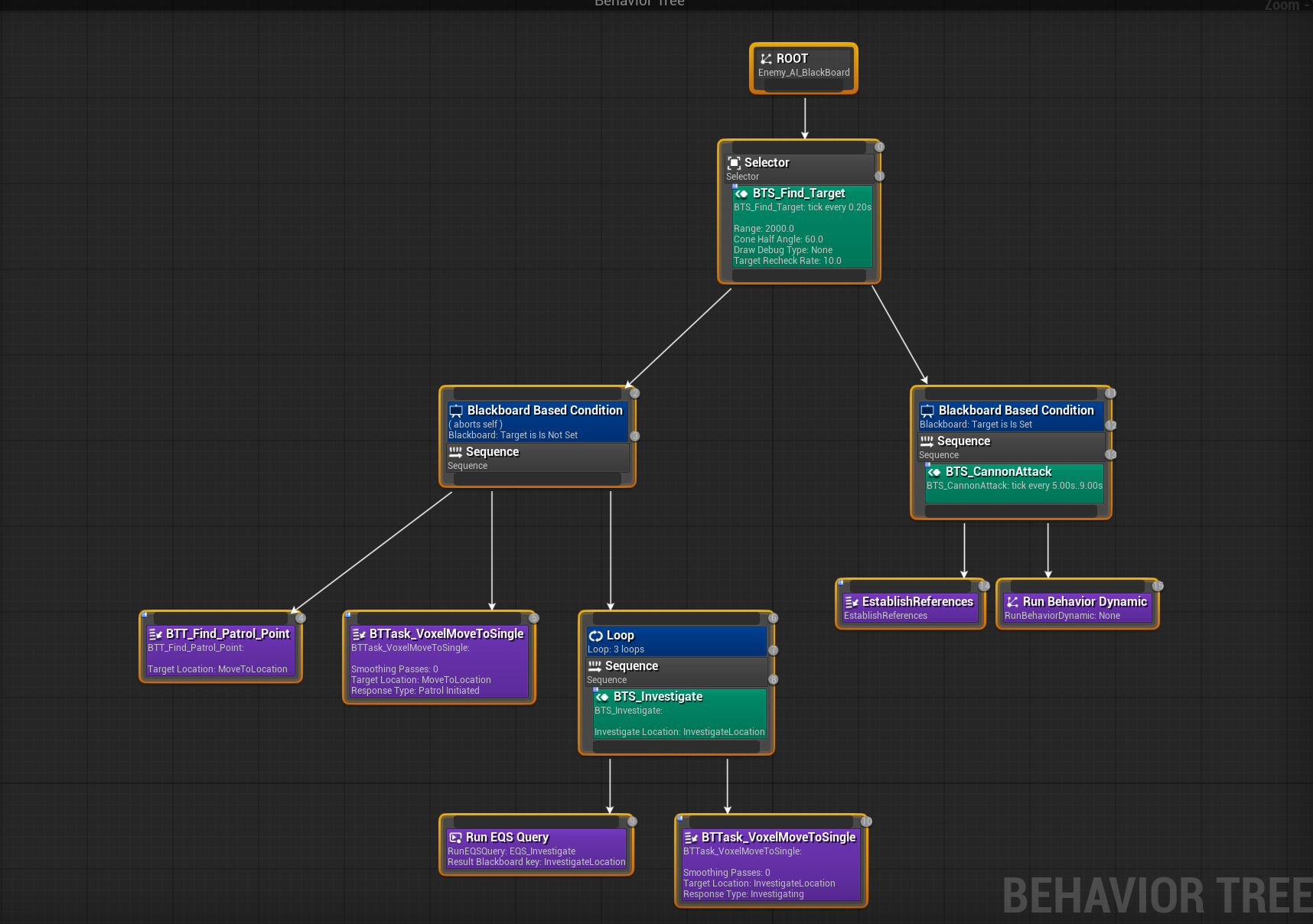
The last step came several months after the pathfinding fixes, right before our demo at New Game+ during London Games Festival, and that was proper EQS implementation. Beforehand we were doing some really hacky and janky target tracking for the enemies, where they randomly followed an invisible target actor that moved withing the voxel bounds. Now the swap needed to happen. We wanted to implement true Perception (Hearing, Damage, etc.) and then base behaviours off those states. For this implementation we settled on three states:
Patrolling
Searching
Attacking
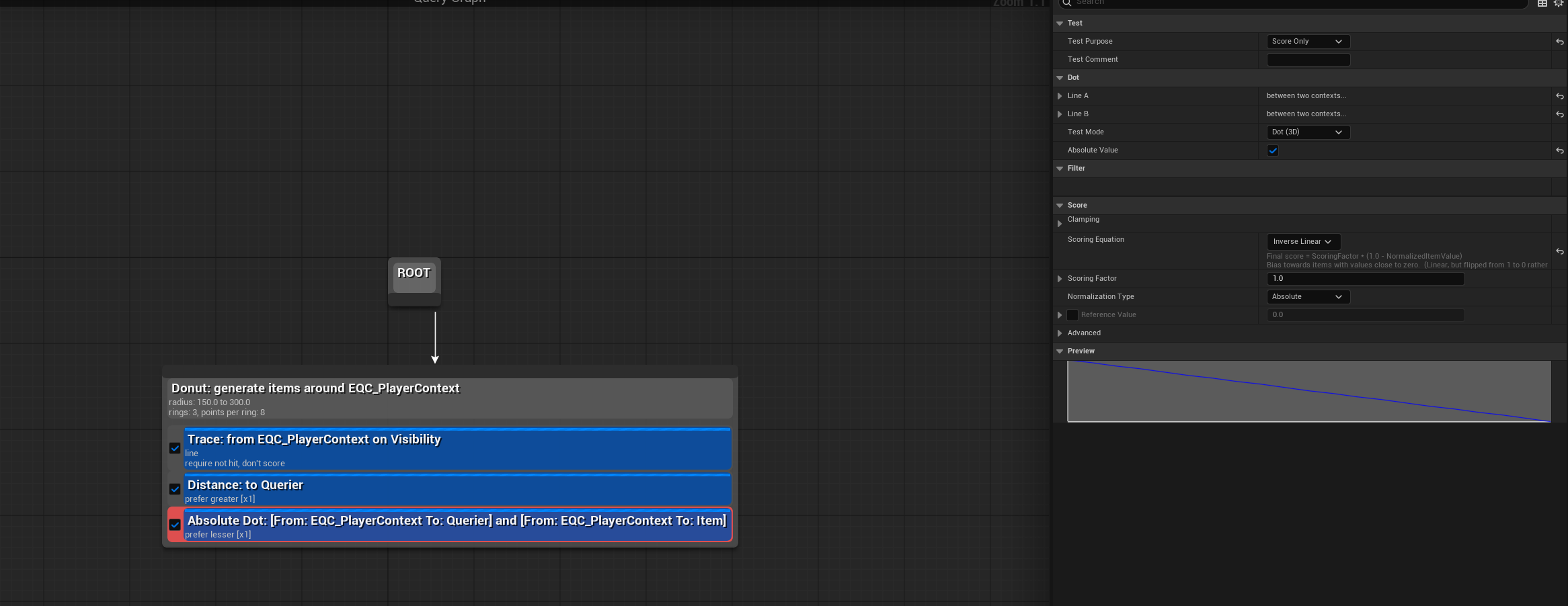
These three states each depended on unique EQS queries, which were also unique to each enemy, making some close distance when attacking or other back away for long range attacks. Because these queries are simple visibility checks, the filtering and scoring of nodes worked perfectly with our frankensteined pathfinding plugin. This made a huge difference to our enemies, making them actually reactive, even giving them fallback queries so they can hover around entry ways and tight spaces extremely effectively. Using some simple Dot product math aswell, I could make some enemies choose points based on their position to the player, making them get a flanking position on the player or close in on the sides!